Reddit Ads Guide
Reddit Ads Manager: The Complete Walkthrough (2026)
I've spent a lot of hours inside Reddit Ads Manager, both running FeedHeat's own campaigns and poking at client accounts people have asked me to audit. It's a decent tool with a few sharp edges nobody warns you about. This walkthrough covers the whole thing: login, account creation, the dashboard, campaign structure, tracking, and reporting, plus where the platform quietly under-reports your results.
What is Reddit Ads Manager (and where to log in)
Reddit Ads Manager is Reddit's self-serve advertising platform. Log in at ads.reddit.com. If you don't have an advertiser account yet, create one free at ads.reddit.com/register — any Reddit account works as the starting point, and setup takes about five minutes.
That's the navigational answer. The longer one: Ads Manager is where everything paid on Reddit happens. Campaign creation, subreddit and interest targeting, budgets and bids, creative uploads, the pixel and Events Manager, audience building, and reporting all live in this one dashboard. If you're still deciding whether Reddit deserves a slice of your budget at all, my complete guide to Reddit advertising covers the strategy layer; this page is about the tool itself.
Creating your Reddit Ads account step-by-step
The registration flow is short but has two irreversible choices buried in it. Here's the sequence, per Reddit's own setup documentation:
- Go to ads.reddit.com/register. Sign in with an existing Reddit account or create a fresh one. I'd use a company account, not your personal one where you argue about keyboards.
- Enter your business details. Company name, business email, your name, and industry. There's a checkbox for "I work with an advertising agency" if you're setting this up for a client.
- Pick your country and currency carefully. These are locked to the ad account permanently once set. If your finance team bills in EUR and you pick USD here, you'll live with that mistake or create a second account.
- Verify your email. Reddit sends a confirmation link; the account isn't live until you click it.
- Add a payment method. Credit card or, for larger spenders, monthly invoicing if you qualify. You can skip this step and add billing later, but you'll need it before anything serves, and it's also a condition of the promo credit below.
- Claim the new-advertiser credit. Reddit runs a spend-match offer for first-time advertisers: at the time of writing, spend $500 within the window and get $500 in ad credit back, claimable via the "claim offer" prompt in the top navigation within 30 days of account creation. The credit lands within about 24 hours of hitting the threshold and expires 90 days later, per Reddit's advertiser credits terms. Some partner platforms advertise a $1,000-for-$1,000 version of the same match. Offers rotate, so check what's live in your account rather than trusting a blog post, including this one.
One honest note on that credit: it's real money, but it nudges you to spend $500 faster than you should. Spend at the pace your testing plan dictates and treat the match as a bonus, not a deadline.
A tour of the dashboard
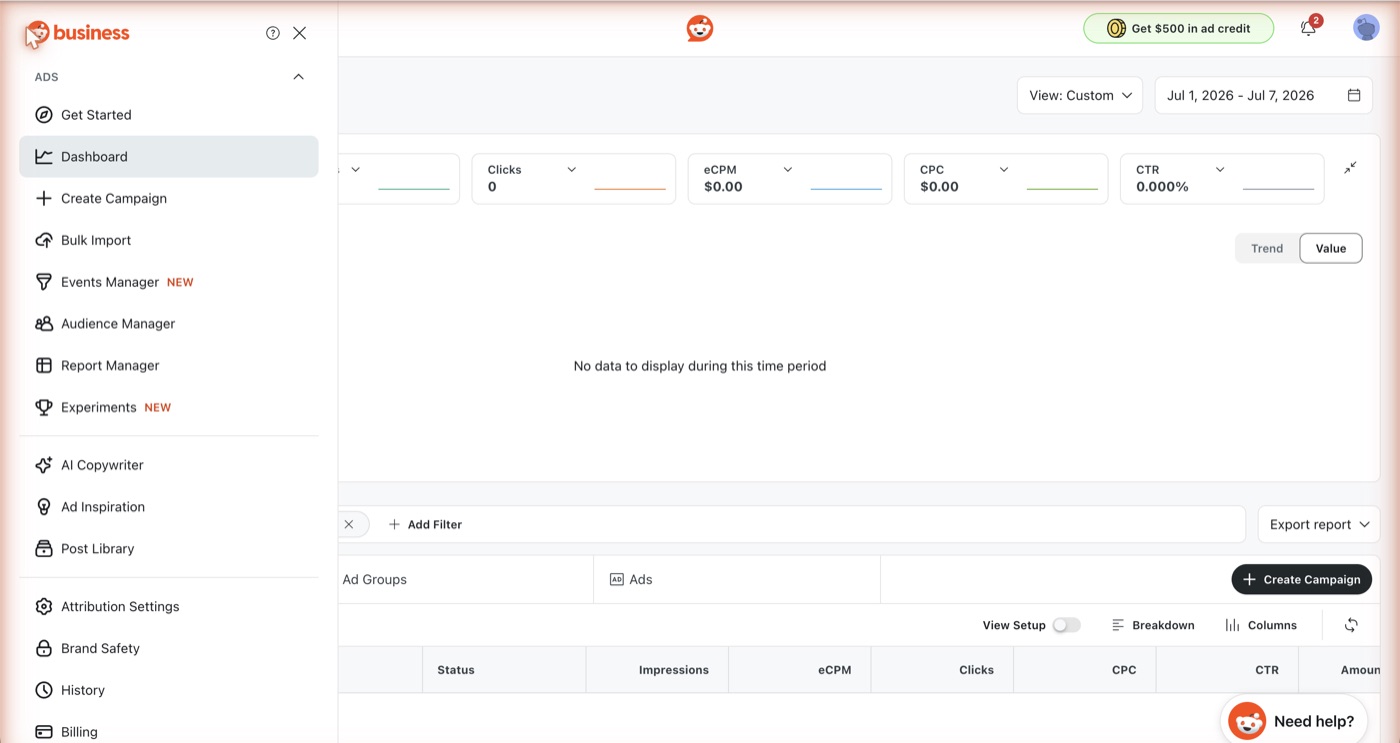
Once you're in, the left navigation is your map. Six areas matter.
Campaigns
The default view. Every campaign with status, objective, spend, and delivery. The thing to learn early is the column customization: the default columns hide CPA and conversion counts, which are the numbers you should care about. Set up a custom column preset in week one and make it your default view.
Ad Groups
One level down. This is where targeting, budget, bid, and placement live, which makes it the tab where optimization happens. When a campaign underperforms, the answer is almost always in here, not in the campaign settings.
Ads
The creative layer. Each ad shows its own CTR, spend, and approval status. Reddit reviews every ad before it serves — officially up to 48 business hours, per the ad review process documentation — so a "pending" badge here isn't a bug, it's the queue.
Audiences
Custom audiences, retargeting lists, and lookalikes built from pixel traffic or uploaded customer lists. Empty for new accounts, obviously, and it stays useless until your pixel has collected a few weeks of data — month two territory.
Events Manager (Pixels)
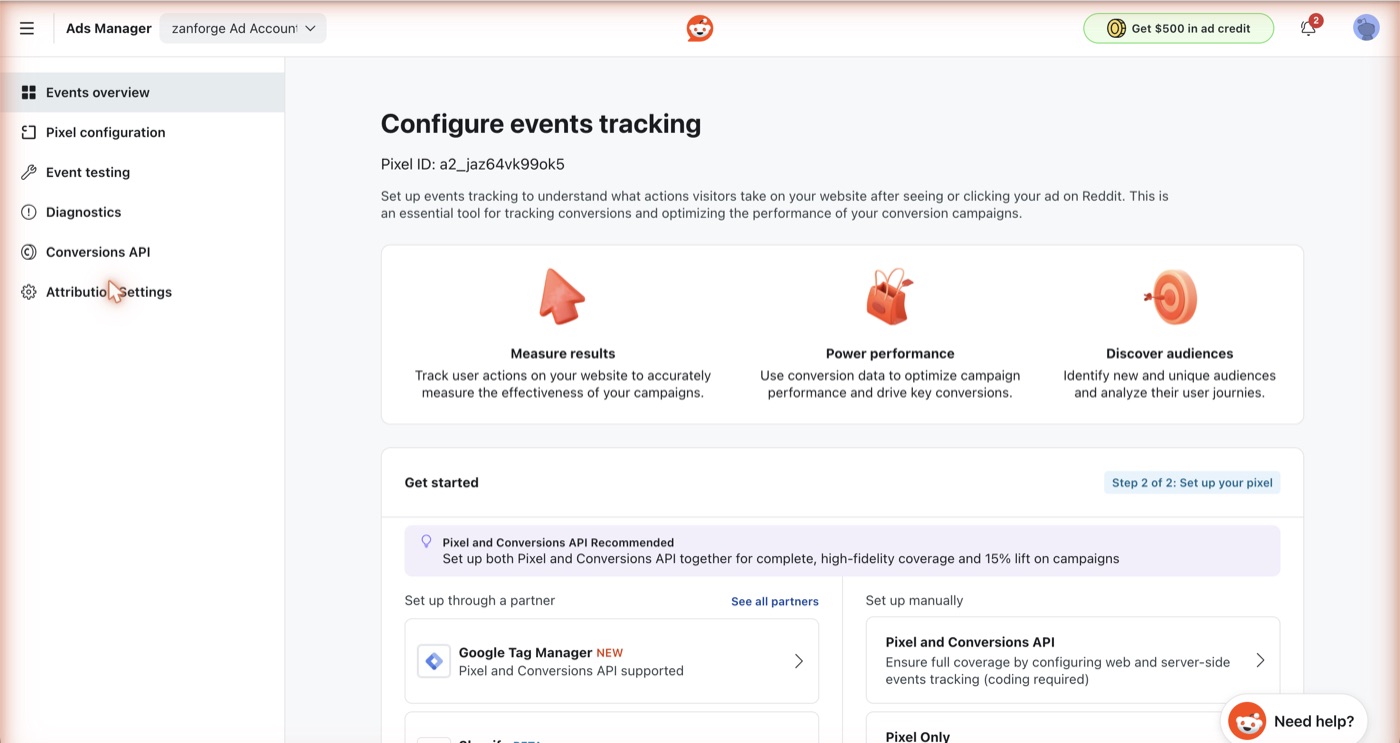
Where you create your pixel, generate Conversions API tokens, and verify that events are firing — covered in depth below, because it's the section most people rush through and regret.
Reporting
Custom report builder with scheduled exports. For a small account the Campaigns view with good columns covers 90% of needs; Reporting earns its keep once you're running multiple objectives and need breakdowns by community or placement.
How Reddit campaigns are structured
Reddit uses the same three-tier hierarchy as Meta, so if you've run Facebook ads this will feel familiar. What matters is knowing which decisions live at which level:
| Level | What you set here |
|---|---|
| Campaign | Objective (traffic, conversions, awareness, video views, app installs, engagement), campaign name, optional spend cap |
| Ad group | Targeting (subreddits, interests, geo, device), budget, schedule, bid strategy and bid amount, placement |
| Ad | Creative: post format, headline, media, destination URL, CTA button |
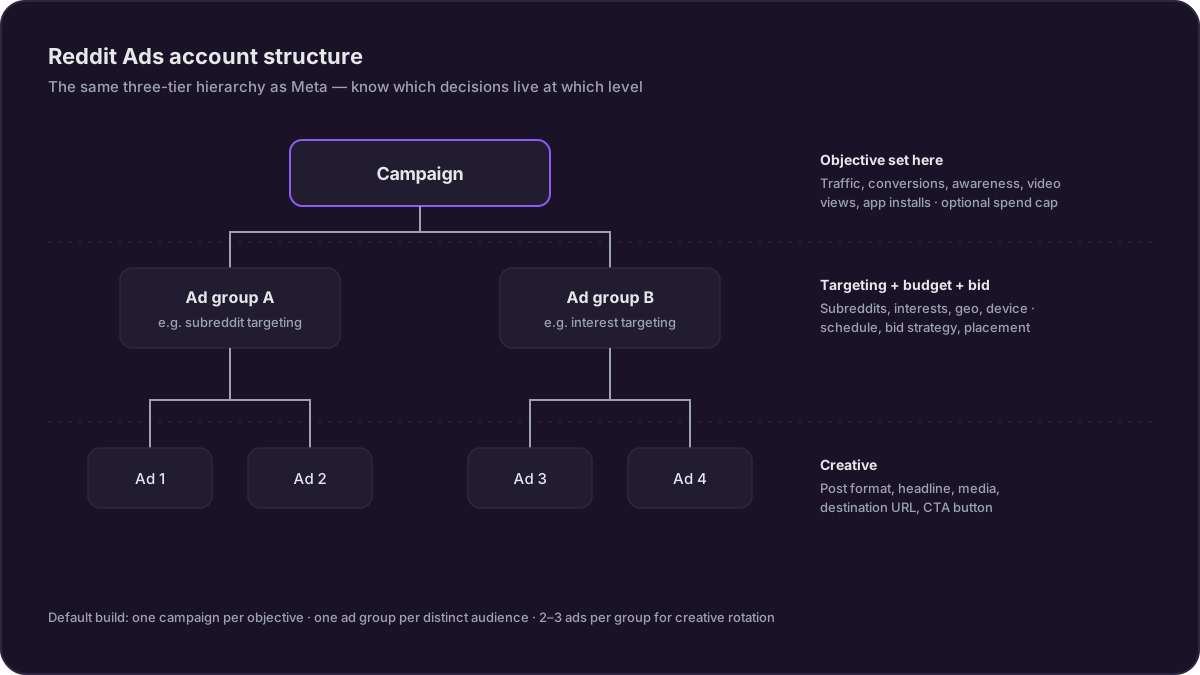
The practical consequence: you can't change objective without a new campaign, and you can't split budgets between audiences without separate ad groups. My default build for a new account is one campaign per objective, one ad group per distinct audience (say, one targeting specific subreddits and one targeting interest categories), and two to three ads per group so Reddit's delivery system has creative options to rotate.
Keep names boring and systematic. "Conversions_US_Subreddits_Feb" beats "Test 4 final FINAL" when you're reading reports six weeks later.
Setting up the Reddit Pixel (and the Conversions API)
This is the section that decides whether your reporting means anything, so slow down here.
The pixel itself
The Reddit Pixel is a JavaScript snippet that reports visitor actions on your site back to Reddit, powering conversion reporting, retargeting audiences, and conversion-optimized bidding. You create it in Events Manager, and Reddit gives you a base code block to install. Placement instruction, straight from Reddit's pixel documentation: put the snippet inside the <head> of every page, as high up as possible, before the closing </head> tag. It works from the <body> too, but fires later and drops more events, so don't.
If you use Google Tag Manager, install it there instead of hand-editing templates; Shopify, Webflow, and most site builders have documented integrations.
The base code fires a PageVisit event on every load. On top of that, Reddit supports standard conversion events you trigger with one extra line, rdt('track', 'EventName'):
| Event | When to fire it |
|---|---|
PageVisit | Every page (fires automatically with the base code) |
ViewContent | Product or key landing page views |
AddToCart | E-commerce add-to-cart |
Purchase | Completed order (pass value and currency) |
Lead | Form fill, demo request, contact submission |
SignUp | Account or trial registration |
Fire the event that matches your campaign objective at minimum. If you optimize for conversions but only ever send PageVisit, Reddit's bidding has nothing to learn from.
Why the pixel alone under-reports
Client-side tracking has been decaying for years. Safari's tracking prevention caps cookie lifetimes, iOS App Tracking Transparency cut off a chunk of mobile signal, and ad blockers simply eat the script. The result is that a pixel-only setup will show you fewer conversions than you got. Not slightly fewer, either; on audiences with heavy Safari or ad-blocker use (which describes Reddit's tech-leaning user base well), the gap can be large enough to make a working campaign look like a failing one.
When to add the Conversions API
Reddit's Conversions API (CAPI) is the fix: your server sends conversion events directly to Reddit, no browser involved. Setup outline:
- In Events Manager, open Conversions API in the sidebar and generate a conversion access token — a long-lived key any admin on the ad account can use.
- Send events from your backend (or through a tag platform like Segment, Tealium, or a GTM server container) to the CAPI endpoint with that token.
- If you run pixel and CAPI together — which is the recommended setup — send a matching conversion ID and event name from both sides so Reddit can deduplicate the doubled events.
- Verify everything in Events Manager's testing view before trusting the numbers, and strip any
test_idfields before production.
My rule: if you're spending under about $1,000/month, pixel-only is a tolerable simplification while you validate creative. Beyond that, the measurement error costs you more than the afternoon of engineering time CAPI takes.
And the Ads API, for management
Separate thing, often confused with CAPI: the Reddit Ads API (v3) is for programmatically creating and managing campaigns, ad groups, ads, and reports. It's open to developers — you'll find credentials and documentation links under Settings > API Access in Ads Manager. Useful if you're building automation or managing many accounts; irrelevant for a single self-serve account, where the dashboard is faster.
Reporting: the metrics that matter
Reddit will show you thirty columns. Watch three, chosen by objective:
| Objective | Primary metric | Sanity-check metric |
|---|---|---|
| Traffic | CPC | CTR |
| Conversions | CPA | CVR |
| Awareness | CPM | Frequency |
For calibration, agency-aggregated benchmarks (methodology unpublished, so treat as directional) put B2B SaaS on Reddit at $0.50–$2.00 CPC with 0.5–1.2% CTR, and conversion rates around 2–8% for signups versus 1–3% for purchases. Median CPC across verticals runs about $1.25–$1.85 per Stackmatix's 2026 benchmarks.
On the accounts I've run or watched, a healthy first week looks like this: spend delivering evenly (not stuck at 10% of budget), CTR somewhere around 0.3–0.5% or better on feed placements, and CPC inside the benchmark range for your vertical. Conversions will lag; the pixel needs volume before CPA stabilizes, so I don't judge conversion cost until at least 15–20 conversions are recorded. What you're looking for in week one is whether the click side of the economics works. For the budget side — how much to commit before the test is even meaningful — I've written up what to actually budget separately, with the CPC and CPM tables to plan against.
One week-one warning sign worth acting on immediately: CTR under 0.2% with even delivery usually means creative mismatch with the communities you're targeting, and no amount of bid tuning fixes it.
Self-serve vs managed accounts
Everything above describes self-serve, which is what you get by default and what most readers of this page should use. Reddit also runs managed accounts, where a Reddit team helps plan and run your campaigns. The commonly cited entry point is a $30,000 minimum quarterly budget (Social Media Examiner's self-serve guide); Reddit doesn't publish an official threshold, and in practice their sales team has discretion.
What managed gets you: a named account manager, campaign planning support, creative feedback, earlier access to some formats and betas, and access to reserved placements like Takeovers that never appear in the self-serve UI. Whether you should want it is a different question. The account managers I've interacted with are genuinely helpful on platform mechanics and genuinely incentivized to grow your spend. Take the beta access and the placement knowledge; make budget decisions from your own dashboard.
If you're under the threshold, don't feel deprived. Self-serve has everything you need to find out whether Reddit works for your product.
5 common Ads Manager setup mistakes
- Launching without conversion events configured. You get a week of clicks and no idea what they did. Install the pixel before the first campaign, not after.
- One giant ad group. Subreddit targeting mixed with interest targeting in a single ad group means you'll never know which one produced results. Split them.
- Ignoring the country/currency lock at registration. Covered above, and I keep meeting people who found out the hard way.
- Judging results on day two. Between the 48-business-hour review queue and the delivery system's learning period, the first few days are noise. Give a test two weeks and a real budget; my best-practices guide has the testing sequence I use before scaling anything.
- Leaving "Expand your audience" style automatic extensions on for niche B2B targeting. Reddit's expansion features help broad consumer campaigns and dilute tight subreddit strategies. Check every default toggle before launch.
Track organic alongside paid
Here's the blind spot built into everything above: Ads Manager reports on impressions you bought and nothing else. Meanwhile, in the exact subreddits you're targeting, people are asking for recommendations in your category, comparing you to competitors, and posting threads that will sit in Google's results long after your campaign budget is gone. None of that shows up in any dashboard Reddit gives advertisers. Your paid CPA can look great while an unanswered complaint thread quietly becomes the top search result for your brand.
That gap is what we built FeedHeat for. It's a team that monitors the subreddits you care about and flags the conversations worth joining — someone asking for recommendations in your category, say, or a comparison thread where you're absent. Our writers learn the tone rules per community, and the monthly report shows how your brand shows up on Reddit and in AI answers over time. Run it next to Ads Manager and you're covering both halves of Reddit instead of the half you can bid on.
The organic side your Reddit channel needs
Ads Manager runs your paid side. FeedHeat helps you build the organic one: a visible, credible brand presence in the communities your buyers read, with regular reports and a monthly AI visibility check.
Book a DemoFrequently asked questions
How do I log into Reddit Ads Manager?
Go to ads.reddit.com and sign in with your Reddit account. If you don't have an ads account yet, create one free at ads.reddit.com/register. Note that this is a separate login surface from reddit.com itself: your Reddit credentials work, but the advertising dashboard lives on its own subdomain. Bookmark it, because password managers often save the wrong domain.
Is Reddit Ads Manager free?
Yes. Creating an account costs nothing, and there are no platform or setup fees. You pay only for ad delivery, with a $5/day minimum campaign budget and a $0.20 minimum CPC bid per Reddit's published pricing. New advertisers can also claim a promotional spend-match credit (currently $500 back after spending $500), which effectively halves the cost of your first test.
How long does Reddit ad approval take?
Reddit's Ad Policy team reviews every ad before it serves, and the official guidance is up to 48 business hours. In my experience most ads clear in under a day, but restricted categories (alcohol, health, financial products) can take longer or require extra documentation. Build the review window into your launch plan instead of submitting the morning of a campaign start date.
Does Reddit have an ads API?
Yes. The Reddit Ads API (currently v3) lets you create and manage campaigns, ad groups, ads, and reporting programmatically without touching the dashboard. It's open to developers: you request credentials under Settings > API Access inside Ads Manager. There's also a separate Conversions API for sending server-side conversion events, which pairs with the Reddit Pixel for more complete tracking.